Picture the menu board at your favourite café. There's a QR code in the corner, the same one that's on the table tents, the takeaway bags and the window. Now picture the owner deciding they'd like a different QR code provider. The first thought isn't "which one?". It's "do I really have to reprint all of that?"
We hear some version of that question a lot. The honest answer is: often not, and it comes down to one small detail most people never look at.
It all depends on the address inside the code
A dynamic QR code doesn't hold your menu. It holds a short web address, something like bit.ly/3xYzAb or go.yourcafe.com/menu, and that address sends people on to the page. That's what lets you change where a printed code goes without touching the print.
So when you switch, the question isn't really about the code. It's about who answers that short address. There are three possible answers.
If it's your own domain, everything comes with you
Some businesses put their codes on an address they own, like go.yourcafe.com. If that's you, good news: the domain is yours, so the addresses are too.
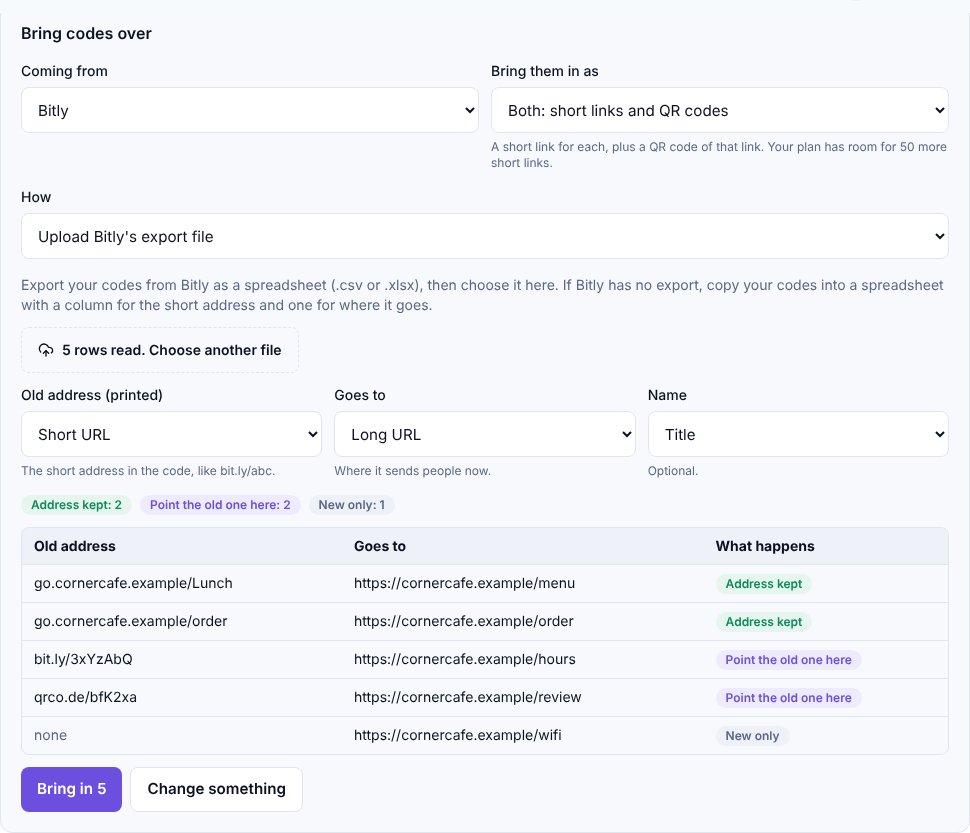
You add the domain to Lynkarr, bring your codes over, and Lynkarr keeps every old address exactly as it was printed, capital letters and all. Before you change anything, a button on the Switch page checks each old address against its new copy, so you can see they match. Then you point the domain at Lynkarr and carry on. Nobody scanning a table tent will ever know.
If it's the old provider's address, there's one extra step
Most codes, though, sit on the provider's own short domain: bit.ly/..., qrco.de/... and the like. Only that provider can answer those, and no new provider can take them over, whatever anyone promises you.
What you can do is send those scans to Lynkarr while your old account is still open. Each code gets a new Lynkarr short link (and a QR code of that link, if you'd like one). We give you a file that pairs every old address with its new one. You change the destination in your old account, and from then on every scan of the old printed code lands in Lynkarr, in your analytics.
When you close the old account, those codes stop working.
That's the one thing to plan for. The Switch page shows how many scans each old code is still getting, so you'll know which signs and flyers to reprint first, and which ones nobody scans any more.
If it's a static code, you're already done
Some codes don't have a short address at all: the destination is written straight into the pattern. Those are called static codes, and they keep working whatever you do, because no provider is involved. There's nothing to move.
Bringing your list across
You don't need to retype anything. Most providers let you export your codes as a spreadsheet, and you upload it on the Switch page. Lynkarr guesses which column is the printed address and which is the destination, and you confirm it. Coming from Bitly, you can paste an access token instead and we read your links directly. The token is used once and not saved.
One thing doesn't make the trip: your scan history. It stays with your old provider, so download it there before you close the account.
What we'd do
If we were moving that café tomorrow, we'd start with the codes on our own domain, because they move cleanly. Then we'd point the old provider's codes at Lynkarr, keep the old account for a month or two, and reprint the busiest signs first.
Switching is on every paid Lynkarr plan, within your plan's number of codes and links. If you're weighing up a move and want a second opinion on your setup, get in touch. We're happy to look.